
This is an old revision of the document!
Table of Contents

…project “made & run(s)” by mecci@c-base.org & zet@c-base.org (since/ano 2022)
codi-project target
“build next level systemterminal for each spacestation zone to get sensors & infoscreens data, play music like the “mpd”-stations, play videos from lan, play stream(s) & media from local network & different internet sources… –> one central terminal per zone (with a full linuxserver behind every codi instance & low power use, ~29W max@running PoC)!” the codi-project is inspired by the spacestation Babylon 5's Babcom System:


“Babcom was (Spacestation) Babylon 5's internal communications network. Public terminals were available in most public areas including the Passenger Lounges, Zocalo as well as modest and better quarters and can link in to StellarCom.”
tribute & thanks @ these opensource projects & software that we use:


codi-project showcase@38c3:
codi showcase setup for 38c3 congress: autoboot / offline useable / 6x rpi3 with rasberian OS (bookworm), 5x codi-terminal(s) / remote controllable setups (z.b. android core) + 1x rpi3 (server) 4lan-service codi-base 🥳 (remote syncronized content play service):


alpha documentation notes:

codi-project (components)
codi terminal(s) (frontend)

(customized multios kodi client @ central mediadb) :
device list @ “\\mfs\mfs\kodi-sync\codis-tribution-system\all-mac-codi-project-devices.txt”


custom codi terminal stations (logo identify) overview:

codi @ rasberianOS (arm64)


- running@spacestation on many rpi3 + some rpi4 + some p400 + 2 rpi5: plain rasberian0s (without X) & kodi21 plain installed…
 ws:10.0.0.152:9090/;  # leuchtetisch win
# ws:10.0.1.168:9090/;  # libreelec zet
# ws:10.0.1.171:9090/;  # kodi20 zet
# ws:10.0.1.170:9090/;  # kodi20 zet
ws:10.0.1.173:9090/;  # brückenecke
# ws:10.0.1.167:9090/;  # nerdcouch
# ws:10.0.1.176:9090/;  # p400z
ws:10.0.1.169:9090/;  # scratecke
# ws:10.0.0.69:9090/;  # brückenecke
#
# UNTERDECK POC
#
ws:rpi3-12OS:9090/;
ws:rpi3-17OS:9090/;
ws:rpi3-19OS:9090/;
# ws:10.0.0.75:9090/;
# ws:rpi3-22OS:9090/;
# ws:10.0.0.250:9090/; #wlan rpi3-22
#
# ws:10.0.0.156:9090/;
# # ws:10.0.1.176:9090/;
# ws:10.0.1.168:9090/;
# ws:10.0.0.197:9090/;
# # ws:10.0.0.108:9090/;
#
# # ws:10.0.0.160:9090/;
# # ws:10.0.0.181:9090/;
#
# # ws:10.0.0.245:9090/;
# # ws:10.0.1.170:9090/;  #brückenecke
# # ws:10.0.1.178:9090/;
# # ws:10.0.0.210:9090/;
# # ws:10.0.0.251:9090/;
# # ws:10.0.0.115:9090/;
# ws:10.0.0.234:9090/;
# ws:10.0.1.172:9090/;
#
codi terminals @ rpi3: status & ops notes (2026-11)
working notes by zet (full howto + scripts: zet's codi-project folder). no passwords here.
- full howto (german, all details, kept in sync with zet's project folder): howto
- access: ssh as user
kodiwith the codi ssh key, only from inside the c-base lan (10.0.0.0/23) - checked terminals run debian 13 (trixie) + kodi 21.3 as
kodi.service; several share the image hostnamerpi3-trixie, so identify them by address / dns name - before touching a terminal: check model, screen resolution, network and
vcgencmd get_throttledfirst, they differ more than the common image suggests
| name | address | hardware / place | state 2026-11-16 |
|---|---|---|---|
| rpi3-trixie | 10.0.1.166 (wlan) | pi 3b, monitor 1680×1050 | tuned, warm-up addon 1.0.2, render direct to plane, screensaver = nerdstatus stream + watchdog |
| rpi3-23OS | 10.0.1.179 (lan) | pi 3b+, 1920×1080 | tuned, warm-up addon 1.0.2, screensaver = nerdstatus stream + watchdog, undervoltage |
| rpi3-24 (dns rpi3-24OS) | 10.0.1.180 (lan) | pi 3b+, screen unknown, edid unreadable → only 1024×768 | tuned, warm-up addon 1.0.1, screensaver = nerdstatus stream + watchdog, undervoltage; not reachable since 2026-11-16 20:00 |
| rpi3-20 (dns rpi3-20OS) | 10.0.1.175 (lan) + wlan | pi 3b+, samsung 24“ 1920×1080 | tuned, warm-up addon 1.0.2, screensaver = nerdstatus stream, wlan fix, undervoltage |
| rpi3-09 (dns rpi3-9OS) | 10.0.1.163 (wlan) | pi 3b, bigscreen mainhall (hisense 65”) | tuned, warm-up addon 1.0.2, wlan fix, c-base loop, fixed 1080p edid |
| rpi3-piss (dns rpi3-13OS) | 10.0.1.168 (wlan) | pi 3b, samsung tv mainhall above the wc | tuned, warm-up addon 1.0.2, c-base loop |
| rpi3-16 / rpi3-15 / rpi3-22 | wlan, dynamic | pi 3b+, debian 12 (older image) | only looked at, nothing changed, undervoltage |


(photos 2026-11-16: rpi3-09 @ bigscreen mainhall, rpi3-piss above the wc, both playing the c-base loop)
- 10.0.1.166 restarted hard on 2026-11-16 19:47 (power loss, undervoltage suspected; files copied just before were filled with zeros): run sync right after copying files to a pi
video screensaver
- addon
screensaver.videosaverplays/home/kodi/Videos/c-base-loop-720p.mp4(or the nerdstatus stream, see infoscreen section) after 1-3 min idle - bug “first screensaver start after a kodi start stays black”: with render method “direct to plane” the video plane gets the size 0x0 if the first playback after a kodi start is a windowed one (the screensaver plays windowed). kodi reports “playing” as usual
- fix A (preferred): addon
service.codi.warmupplays the local loop ~3 s fullscreen at every kodi start, after that the plane is right. install without root: copy the folder to~/.kodi/addons/, send builtinUpdateLocalAddons, enable via json-rpcAddons.SetAddonEnabled - fix B: prime render method EGL. works too but costs frame rate (~20 fps at 1680×1050, only 14 at 1920×1080)
- warm-up addon versions: 1.0.1 uses the local loop if the screensaver is a stream (.strm / url); 1.0.2 always stops the playback it started itself (1.0.0 left a stream running fullscreen). since 2026-11-16 fix B is switched back everywhere, all set up terminals use fix A
- check from remote (root): the
crtc-posof the video plane must show the screen size, not0x0+0+0:
sudo sh -c 'cat /sys/kernel/debug/dri/*/state' | awk '/^plane\[86\]/{f=1} /^plane\[98\]/{f=0} f&&/crtc-pos/'
scripts
copy to the pi, run with sudo bash <script>, take back with sudo bash <script> undo:
codi-rpi3-tune.sh: kodiRestart=always, daily kodi restart at 06:00 (kodi grows: 265 MB fresh, 490 MB after 19 h, killed by the kernel at 650 MB after 8 days), cloud-init / wait-online / man-db timer off, bluetooth off if nothing is paired, swappiness 100 (swap is zram)codi-wlan-fix.sh: networkmanager gives up a wifi profile after a failed handshake and never retries → unlimited retries, wifi powersave off, watchdog every 2 mincodi-screensaver-watchdog.shandcodi-nerdstatus-stream.sh: see infoscreen section
kodi without root
- json-rpc on tcp 9090 works locally without login (read state, set settings, send keys); http 8080 wants the web login
- restart kodi without systemctl: packet to the event server (udp 9777) with builtin
RestartApp
screen not detected (edid)
- rpi3-09 can not read the edid of the tv → falls back to 1024×768 / black screen. fix: fixed edid file
/lib/firmware/edid/codi-1080p.binand in/boot/firmware/cmdline.txt:video=HDMI-A-1:1920x1080@60D drm.edid_firmware=HDMI-A-1:edid/codi-1080p.bin - the cec address comes from the edid: the hdmi input number in the edid file must match the real input (script
edid-set-hdmi-port.py), otherwise the tv switches to another input and kodi pauses the video - rpi3-24 has the same edid problem (1024×768), not fixed yet: screen type unknown
- rpi400-zsmart (stream source) had it with its monitor too, fixed 2026-11-16: same edid file, same cmdline entries with HDMI-A-2 instead of HDMI-A-1. the pi400 loads the graphics driver already in the initramfs, so the hook /etc/initramfs-tools/hooks/codi-edid puts the file in there (run update-initramfs -u after every change of the file)
codi @ windows 10+ (64bit)

codi @ firetv (fireos /android app)

- outdated, kodi19 only, 2muchwork rebuilding app etc.

codi @ libreelec (rasberry)
codi-gaming

codi @ batocera gaming station
(batocera running on rpi4 @55'' touchscreen, location: mainhall)
https://wiki.batocera.org/start


- …
- …
codi multiscreen-terminal @ nerdarea
- mirrored outputs: 3x codi displays + 1 beamer @ codi terminal (rpi4 arm64) arround nerdarea couchzone


- …


PoC: 5x terminal(s) rollout @ spacestation "unterdeck"
5x codi terminals (rpi3 arm64) in testing for rollout @all underdeck sections (29W max power, per setup)

howto connect your local kodi
- to connect your local kodi installation to the spacestation stack do:
   these file "\\mfs\mfs\kodi-sync\advancedsettings.xml" --> copy2your "~homedir/.kodi/userdata/" &
   these file "\\mfs\mfs\kodi-sync\sources.xml" --> copy2your "~homedir/.kodi/userdata/"
«readme»
kodi im c-base netz nutzen mit zentraler mysql@mfs by zet@c-base.org
install kodi auf android oder fireos … einmal anstarten wieder beenden die advancedsettings.xml aus diesem ordner in den kodiordner: android: “…/Android/data/org.xbmc.kodi/files/.kodi/userdata/” kopieren kodi starten sollte sowohl datenbank für filme derien & musik vom \\mfs\ mit allen medieninformationen haben!!!
…habt spass … geht auch bei linux & co & natürlich windoof! (wenn dann gibt es probleme mit netzprotokollunterschieden z.b. nfs mounten)
btw …das kodidevice muss im gleichen internen netz wie der mfs sein! …ausbau der kodis folg …der zet
«/readme»
remote control the codi terminal(s)
- …
- android app @your phone (kodi remote)
- …
- To install Kore on your Android device Android 4.0.3 or higher is required. Kore is available on the Play Store, on F-Droid. External Link
- user alien pwd alien
jellyfin [codi-project@browser]
- …
- …

- user alien pwd alien

codi-base

(lan service 4 syncronized terminal video playing) —self coded (by mecci) network service for syncronized remote video playing on connected codi terminal[s]:
- * running & compiled for win & linux on x86 & arm platforms useable **


codi central file base & mediadb(s)
all codi central spacestation files here via smb (syncpoint kodi, installers, sdcard images,codi-base, etc):
https://kodi.wiki/view/Advancedsettings.xml

- kodi central mariadb https://kodi.wiki/view/MySQL
- jellyfin PoC
- all media infos reimportable via local xml-files (filesystem)
codi infoscreen content via video streamer
(video screensaver source)
- infoscreen nerdarea examples (permanent rotation like):


- videostremsource: rtmp://ctreamer.cbrp3.c-base.org:1935/nerdstatus
- Dieser wird über einem im XVFB im Kios-Mode laufenden Firefox generiert, der folgende URL aufruft:
 …

how the stream is made
- a firefox in kiosk mode runs inside an invisible xvfb display and opens the c-flo infodisplay url above (rotates events / nerdarea / bar-status / nerdarea-music / bar-history, controlled via the mqtt broker c-beam:1882)
- ffmpeg grabs that display (x11grab, 1280×720, 15 fps, h264 + silent audio track) and pushes it to the streaming server ctreamer (10.0.1.102, mediamtx):
rtsp://10.0.1.102:8554/nerdstatus - ctreamer hands it out again as
rtmp://ctreamer.cbrp3.c-base.org:1935/nerdstatus - on a codi terminal it is a one-line kodi file
c-info-nerd.strm(the rtmp url), templates @\\mfs\mfs\kodi-sync\infoscreens-streams\
the three commands the script starts (invisible display, firefox with the status page, ffmpeg to the server):
Xvfb :99 -screen 0 1280x720x24 -nolisten tcp -nocursor &
DISPLAY=:99 MOZ_ENABLE_WAYLAND=0 firefox --no-remote --profile ~/.cache/codi-nerdstatus-profile --kiosk --width 1280 --height 720 "$PAGE_URL" &
ffmpeg -nostdin -hide_banner -loglevel warning \
  -f x11grab -draw_mouse 0 -video_size 1280x720 -framerate 15 -i :99 \
  -f lavfi -i anullsrc=r=44100:cl=stereo \
  -c:v libx264 -preset veryfast -tune zerolatency -profile:v main -pix_fmt yuv420p \
  -g 30 -crf 26 -maxrate 2000k -bufsize 4000k \
  -c:a aac -b:a 64k \
  -f rtsp -rtsp_transport tcp rtsp://10.0.1.102:8554/nerdstatus
x11grab grabs the xvfb :99, anullsrc adds a silent audio track (some players hang without audio), -g 30 = keyframe every 2 s so kodi joins fast, -crf 26 capped at 2 mbit/s keeps the load on the pi400 low. $PAGE_URL is the c-flo infodisplay url above. full script + details: howto
temporary stream source (since 2026-11-16)
the old generator vm has to be rebuilt (other member). until then a pi400 feeds the stream:
- host: rpi400-zsmart (lan 10.0.0.141, user alien, codi ssh key)
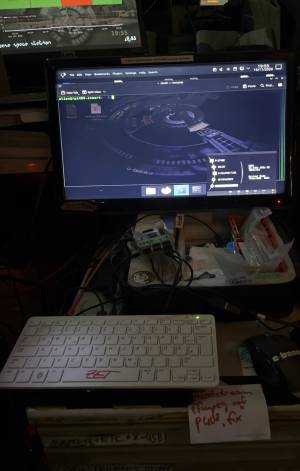 the pi400 at its desk, on the screen above it the nerdstatus stream (2026-11-16 19:55)
- service:
codi-nerdstatus.service(script/usr/local/bin/codi-nerdstatus-stream, settings/etc/default/codi-nerdstatus), starts at boot, restarts itself, independent of the desktop session; firefox is restarted every 6h without interrupting the stream - is the stream there?
curl -sL -b "" -o /dev/null -w '%{http_code}' http://10.0.1.102:8888/nerdstatus/index.m3u8→ 200 yes / 404 no - check:
systemctl status codi-nerdstatus/journalctl -u codi-nerdstatus -f/ still picture:bash ~/codi-nerdstatus-stream.sh shot - when the new vm feeds again: remove the service first (
sudo bash ~/codi-nerdstatus-stream.sh undo), two sources on the same path fight each other - known trap: firefox must start with a fresh profile every time, with a reused profile the page stays black (no connection to the mqtt broker) while the service looks fine. the script does that. so: always look at a still picture, not only at the service state
- boot tested 2x on 2026-11-16: stream is back with picture ~1.5 min after reboot
- old capture attempts (desktop
:0via x11grab / kmsgrab) did not work under wayland, see\\mfs\mfs\kodi-sync\infoscreens-streams\fed-zet-ffmpeg-cmds.strm

codi terminals using the stream as video screensaver
- addon
screensaver.videosaver, setting “VideoFile” =/home/kodi/Videos/c-info-nerd.strm(kodi reads addon settings only at start → restart kodi after changing the file by hand). back to the loop: copysettings.xml.bak-20261116-mp4back in the addon data folder - switched on 2026-11-16: rpi3-trixie (10.0.1.166), rpi3-23OS (10.0.1.179), rpi3-24 (10.0.1.180), rpi3-20 (10.0.1.175); fallback video is
/home/kodi/Videos/c-base-loop-720p.mp4 - if the stream breaks, kodi stays in a “playback failed” dialog and the screensaver addon does not start again until the next kodi restart
- against that: watchdog
codi-screensaver-watchdog(systemd timer, every minute, log:journalctl -t codi-ssw): closes the dialog, plays the stream again or, while the stream is missing, the fallback video, and switches back as soon as the stream is there again. installed on .166 / .179 / .180 (not yet on rpi3-20) - outage test 2026-11-16 (stream off for 3 min): terminals on the fallback video after ~2 min, back on the stream within 1 min after it returned
codi picture screensaver source
(picture screensaver source)
- …
codi: zweite tonspur via ukw radio in der nerdarea hören
insert fotos »>

codi project hardware storage

codi doku im wiki via qr-code


first codi doku (old)


